Laboratories are increasingly integrating automated workflows, AI-assisted technologies, and data management solutions. Connecting laboratory instruments and software to a laboratory information management system (LIMS) helps minimize repetitive manual tasks and lays the foundation for scalable laboratory automation, centralized data management, and the adoption of future AI-driven workflows.
The LIMS Interface option in the STARe thermal analysis software goes far beyond just LIMS integration. In this latest version, it combines two separate functionalities in one piece of software:
- Bidirectional data exchange between STARe thermal analysis devices and LIMS: Sample information, measurement requests, analytical results, and reports can be exchanged between the two systems. This streamlines laboratory processes, maintains data integrity, and reduces the need for manual data handling.
- The integration of STARe instruments into an automated laboratory: External systems, including robotic equipment and laboratory automation platforms, can communicate with the STARe thermal analysis software, monitor instrument status, and control selected instrument functions. This enables automated sample handling and coordinated workflows where external robotic systems communicate directly with STARe instruments.
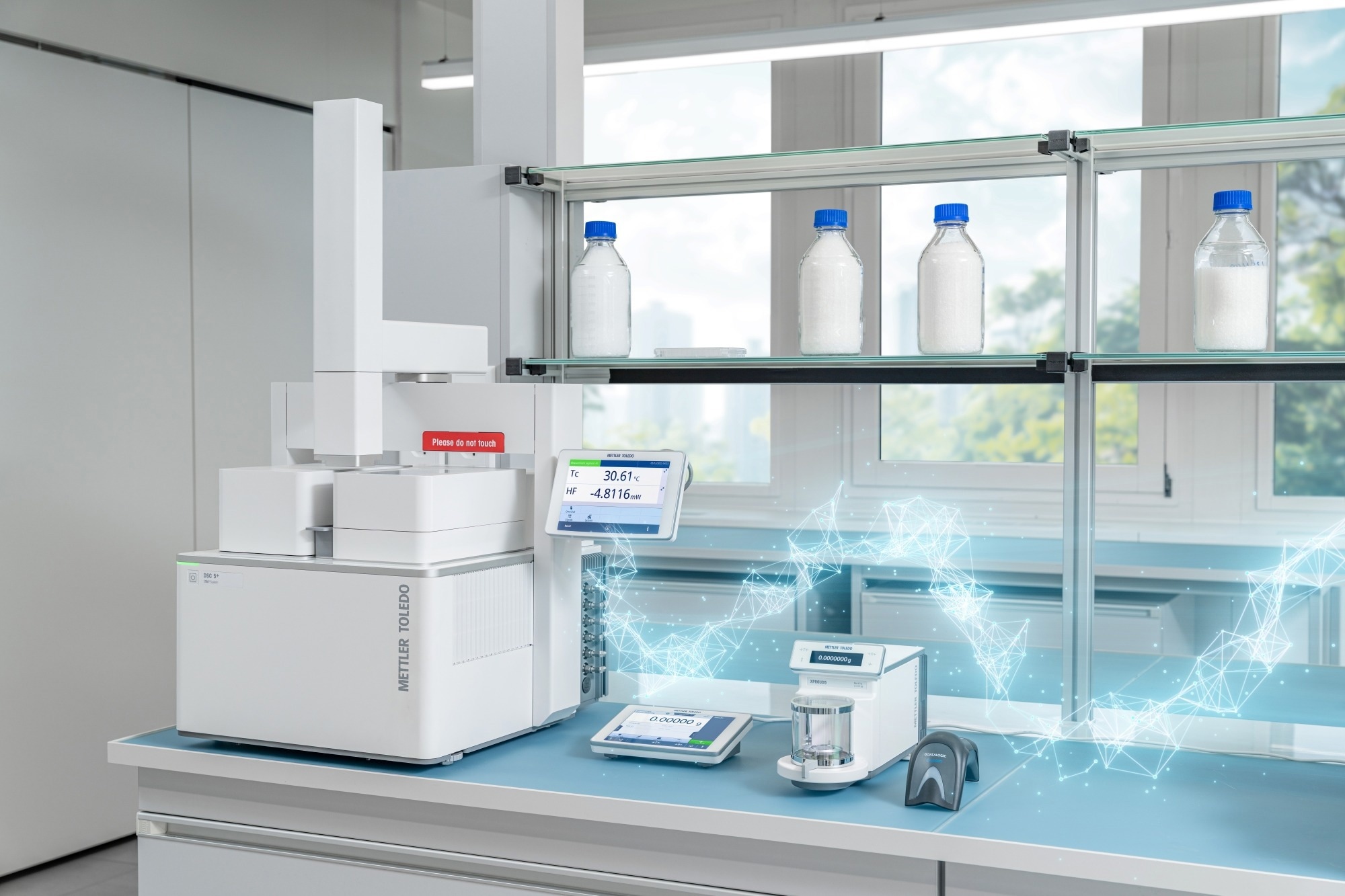
Image Credit: Mettler-Toledo International Inc.
Seamless data exchange between instruments and LIMS
The STARe LIMS Interface option establishes secure, two-way communication between the LIMS environment and STARe software. Sample information, measurement requests, and analytical results can be exchanged between the systems, strengthening the traceability of data and results, and minimizing the need for manual data processing.
Traditional interfaces generally export results to a file path. In contrast, the STARe LIMS Interface supports communication in both directions. Using the STARe Gateway of the LIMS Interface software, laboratories can transmit sample information, measurement requests, and method settings from their LIMS to STARe. Once measurements have been evaluated, the corresponding results, reports, and workflow notifications can be sent back to LIMS.
The LIMS-STARe bidirectional data flow
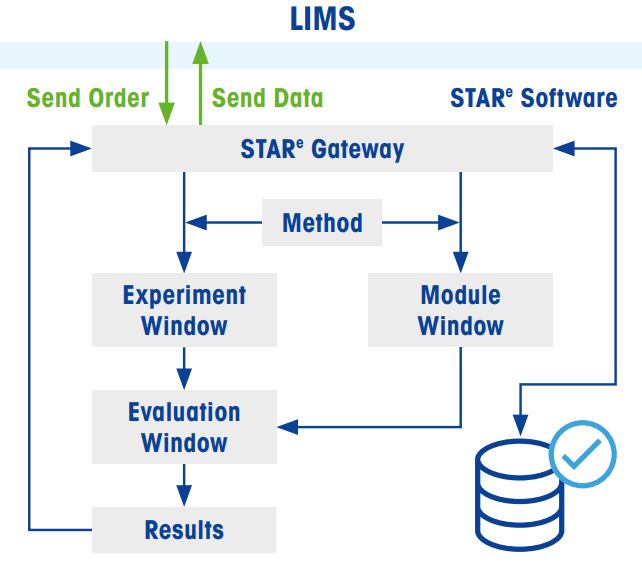
Image Credit: Mettler-Toledo International Inc.
- Submit the order: Sample information, measurement methods, and evaluation specifications are sent from the LIMS to STARe via the STARe Gateway. STARe uses the information to generate a LIMS order, which serves as the basis for performing a thermal analysis experiment. When the 21 CFR Part 11 software option is enabled, the generation of this order is recorded in the audit trail.
- Execute and evaluate the experiment: The experiment is carried out using the STARe thermal analysis system. Measurement data can subsequently be processed and analyzed in the STARe software, with AIWizard™ also available for AI interpretation of the results.
- Send the data: Selected results, complete evaluations, reports, and workflow-related notifications can be transmitted back to the LIMS. This makes the relevant analytical information accessible within the LIMS.
Features and benefits of the bidirectional data flow
- LIMS-driven experiment management for sending measurement requests directly from LIMS to STARe
- Bidirectional LIMS connectivity to fully integrate STARe thermal analysis systems into an interconnected laboratory environment
- Comprehensive data exports of completed evaluations, measurement curves, and related data allow traceable documentation
- Selective result export that returns only selected, key results to the LIMS for enhanced quality control
- Compatibility with the 21 CFR Part 11 software option support regulatory compliance and audit requirements
- Automation with AI-enabled methods to automatically evaluate measurements results
How the bidirectional data flow works
Creating experiments from LIMS orders
- Open the relevant LIMS order in the STARe Experiment Window, choose the appropriate instrument, and submit the experiment for execution.
- Initiate the experiment directly from the LIMS order. In this case, the order must specify the corresponding instrument and module.
This process ensures that experiment details are transferred from the LIMS to STARe in a traceable way.
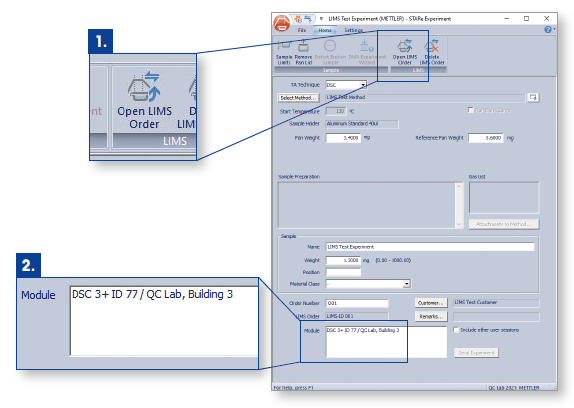
Image Credit: Mettler-Toledo International Inc.
Exporting selected results to LIMS
The STARe LIMS Interface software also allows the transfer of individual evaluation results when only specific measurement parameters are needed in the LIMS.
For instance, during quality control procedures, laboratories may require only certain key results, such as the melting onset temperature or enthalpy, even if the measurement includes additional evaluation results. The Interface software allows multiple, selected results to be exported at the same time. Optional validation criteria can also be applied, enabling efficient data exchange and supporting decision-making.
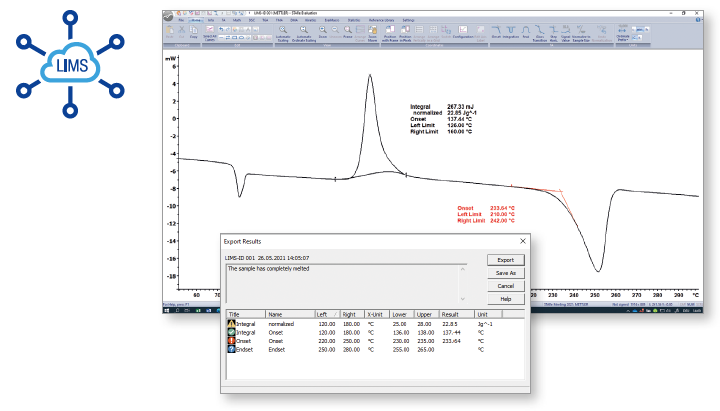
Image Credit: Mettler-Toledo International Inc.
Generating reports
Reports containing measurement data, selected results, and evaluation information can be created directly in STARe and transferred to LIMS with a single click.
If several measurement curves are linked to different LIMS orders, the user can choose the appropriate order before initiating the report transfer. This provides a straightforward way to maintain organized documentation and incorporate thermal analysis results into existing laboratory workflows.
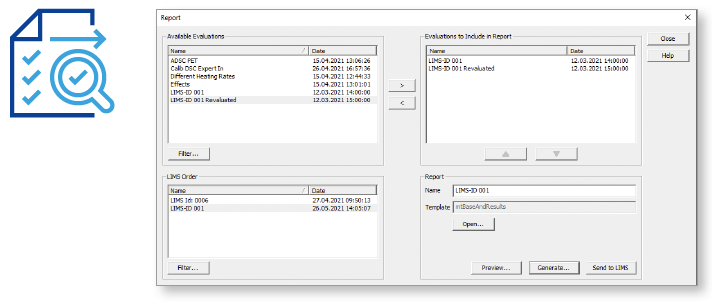
Image Credit: Mettler-Toledo International Inc.
Integrate STARe instruments into an automated lab
Beyond transferring information, the LIMS Interface software can communicate directly with laboratory automation platforms. These systems can retrieve instrument status, exchange information, and carry out selected instrument commands. This functionality provides the technical basis for incorporating thermal analysis equipment into fully automated laboratory environments.
Modern laboratories increasingly use robotic systems and collaborative robots (cobots), automated sample preparation equipment, and centralized automation platforms to streamline repetitive tasks. Supporting these workflows requires thermal analysis systems to communicate not only with the LIMS, but also with external equipment and automation platforms.
The STARe LIMS Interface makes this possible by allowing external systems to monitor thermal analysis device status, exchange data, and execute selected instrument commands. Laboratory automation platforms can therefore coordinate sample handling, instrument operation, and measurement scheduling within a connected workflow.
Together with the integrated sample robots available for DSC, TGA, and TMA, the STARe LIMS Interface software allows thermal analysis instruments to become key pieces of equipment in fully automated environments.
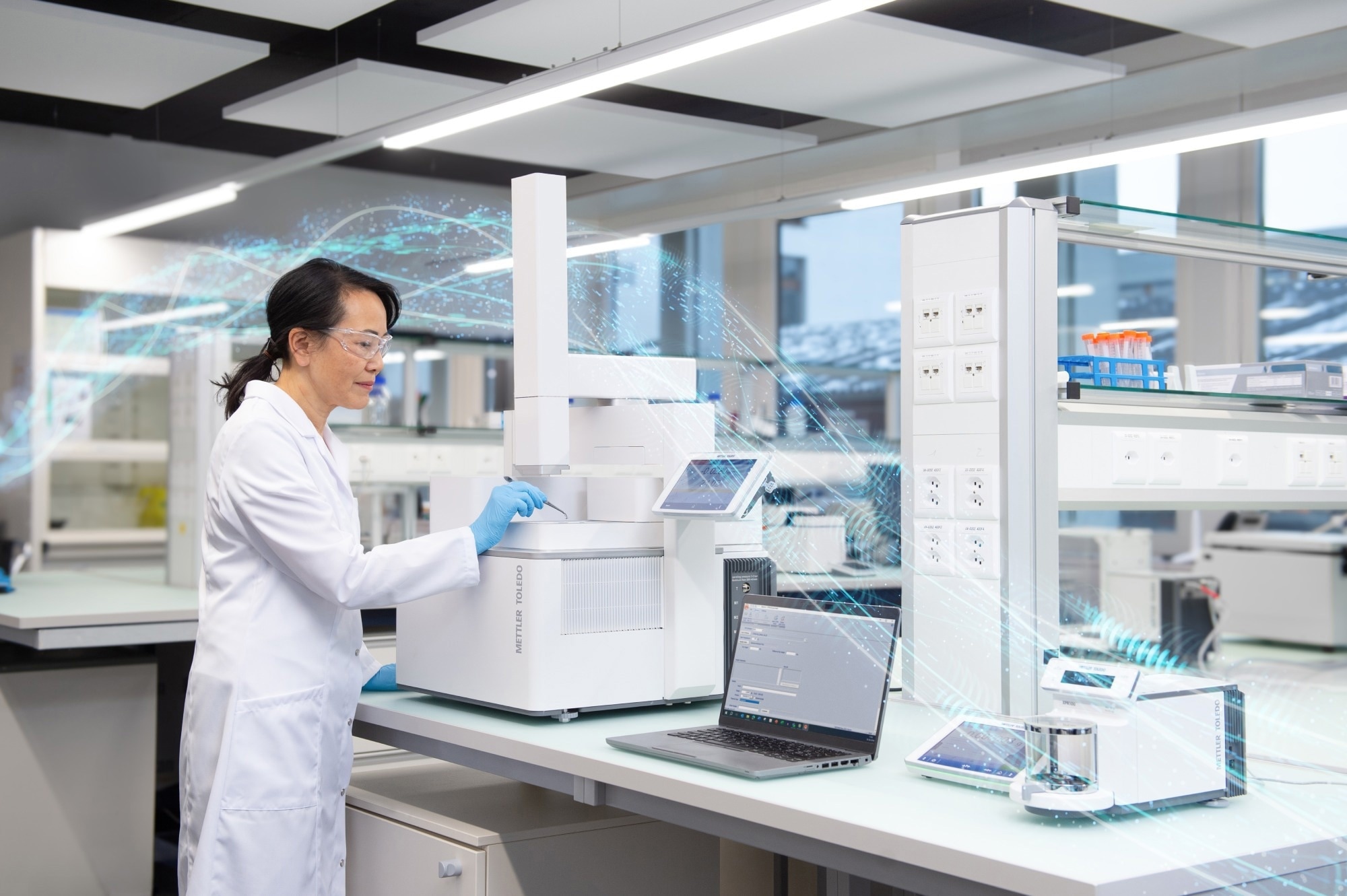
Image Credit: Mettler-Toledo International Inc.
The fully automated laboratory environment
The STARe LIMS Interface provides a communication link connecting STARe instruments with LIMS and laboratory automation platforms. The LIMS is responsible for managing sample orders and results, while the automation platform coordinates connected robots and instruments through the exchange of status information and commands.
This supports coordinated sample handling, automated measurement execution, and efficient transfer of samples and results between laboratory equipment.
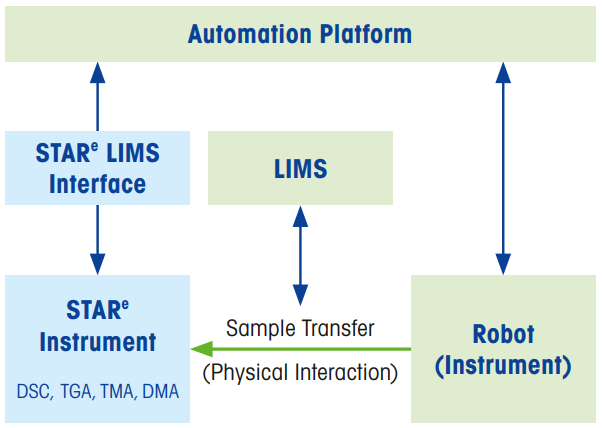
Image Credit: Mettler-Toledo International Inc.
Features and benefits of integrating STARe into an automated lab
- Instrument status monitoring for increasing efficiency when scheduling laboratory resources
- Instrument function control to facilitate direct interactions between STARe instruments and robots and cobots
- Automatic experiment management to reduce the need for manual intervention and support unattended instrument operation
How instrument integration with an automated lab works
Sychronizing lab workflows
The STARe Interface provides notifications at key stages, including when measurements are completed, when results become available, or when an instrument’s status changes. All of these notifications are delivered in real time. This allows automation platforms to coordinate instruments, robots, cobots, and the LIMS without any manual user intervention.
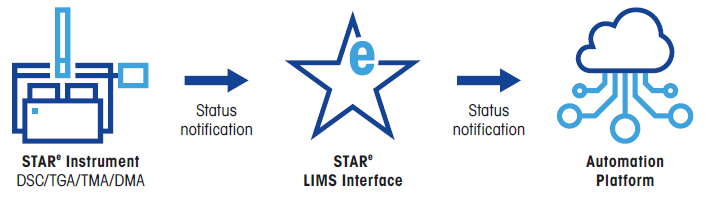
Image Credit: Mettler-Toledo International Inc.
Monitoring instrument status
Connected automation platforms can continuously monitor connected instruments and regularly retrieve information to track operating conditions. Available information can include current instrument status, remaining measurement runtime, queued experiments, the status of connected sample robots, and furnace conditions. Access to this information helps automation systems to allocate laboratory resources efficiently.
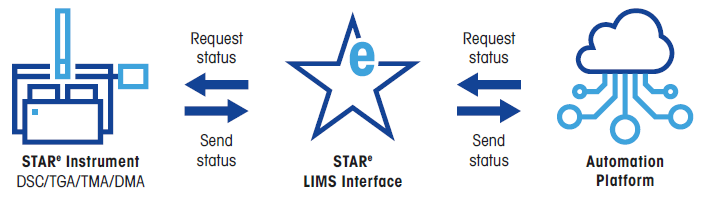
Image Credit: Mettler-Toledo International Inc.
Controlling instrument functions
The STARe LIMS Interface also allows selected instrument operations to be run remotely. Depending on the application, external automation systems can issue commands to open or close the crucible chamber, initiate measurements, reset instruments, or manage the automatic execution of experiments.
This functionality establishes a direct connection between robotic equipment, laboratory automation systems, and STARe instruments, enabling coordinated instrument operation with reduced manual intervention.
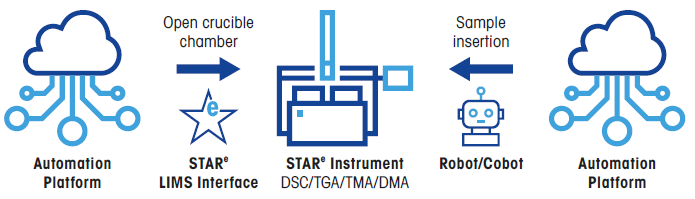
Image Credit: Mettler-Toledo International Inc.
STARe Software: The Standard in Thermal Analysis
STARe is the most comprehensive thermal analysis software currently on the market, offering exceptional flexibility and unlimited possibilities for evaluating measurement data.
Operation of the STARe LIMS Interface requires the Experiment Window software. Additional functionality can be achieved with AIWizard, which provides AI-assisted evaluation of results or an additional expert perspective on measurement data. For laboratories working under regulated conditions, the 21 CFR Part 11 software is also available.
About the Experiment Window
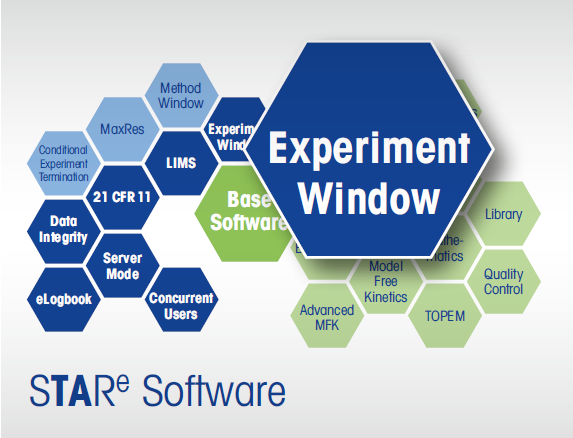
Image Credit: Mettler-Toledo International Inc.
The Experiment Window offers a centralized workspace for setting up, managing, and executing thermal analysis experiments. It is a prerequisite for using the STARe LIMS Interface and provides the functionality needed to create and process LIMS orders.
The key capabilities of the Experiment Window include:
- Creation and execution of experiments
- Assignment of measurement methods and instruments
- Monitoring or measurement processes
- Processing LIMS orders
About AIWizard™
AIWizard uses AI to assist with the interpretation of thermal analysis measurement data. Its underlying neural network has been trained using thousands of expert evaluations, allowing it to automatically identify and evaluate thermal effects. This helps improve consistency in result interpretation while reducing the time required for manual evaluation.
AIWizard features include:
- Automation-ready AI to integrate AIWizard into LIMS-based workflows
- AI-assisted data evaluation for automatic analyses
- Expert second opinions for additional support with interpretations
- Continually improved neural network
About the 21 CFR Part 11 software
The 21 CFR Part 11 software option provides technical functionalities designed to support compliance with the requirements of 21 CFR Part 11. When this option is enabled, the creation of LIMS orders is documented in the audit trail.
Available functionalities include:
- Password-based user access control
- User-level administration with user roles and profiles
- Electronic signatures to manage the status of electronic records
- Audit trails to document changes and system histories

This information has been sourced, reviewed, and adapted from materials provided by METTLER TOLEDO - Thermal Analysis.
For more information on this source, please visit METTLER TOLEDO - Thermal Analysis.