Why Use SWIR Linescan Imaging?
A SWIR linescan camera builds a continuous, high-resolution image of material that is already moving, such as wafers, webs, conveyors, and sorted products. It pairs the throughput of line imaging with the material contrast of the shortwave infrared (0.9–1.7 µm) band.
SWIR reveals features that are weak or invisible to visible (RGB) cameras:
- Through-silicon features at suitable wavelengths
- Water and moisture differences
- Polymer and material separation
- Coatings, adhesives, and sealants
- Composition and foreign material in food and agriculture
This article outlines the use of the LiSa SWIR Linescan Camera as the reference instrument.
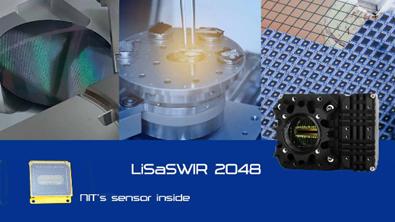
Image Credit: Pembroke Instruments, LLC
How a Linescan Camera Forms an Image
A linescan camera records one row of pixels per exposure, not a full rectangular frame. The detector supplies the X dimension across the target, while motion of the conveyor, web, or stage supplies the Y dimension.
- The camera exposes one narrow slice across the moving target.
- The target advances by one sampling distance.
- The camera exposes the next slice, triggered by time or an encoder.
- Software stacks thousands of successive lines into a continuous 2D image.
This suits rolls, webs, wafers, and conveyor sorting, where the material already passes a fixed inspection point. An area-scan camera remains the better choice for stationary targets.
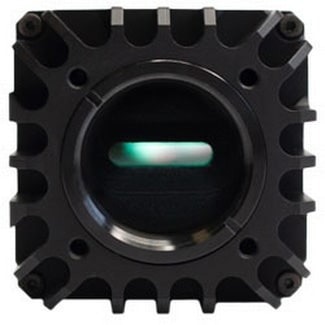
LiSa SWIR linescan camera - 2048 x 1 InGaAs sensor, C-mount, 45.4 × 75 × 58 mm, 280 g. Image Credit: Pembroke Instruments, LLC
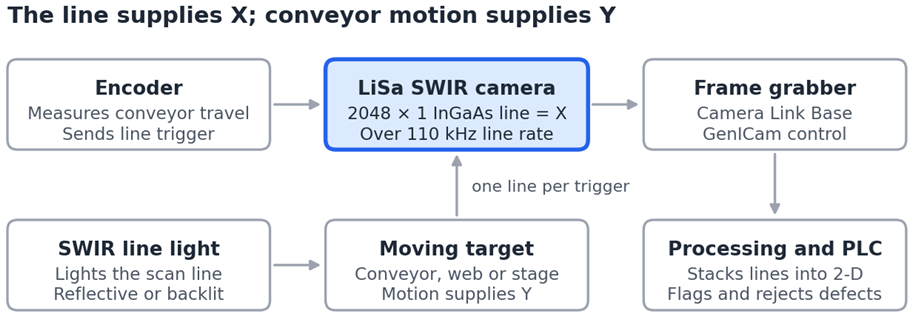
Figure 1. SWIR linescan inspection setup. The encoder ties each line exposure to conveyor travel, so image geometry holds even when speed varies. Image Credit: Pembroke Instruments, LLC
Key Specifications and What They Mean in Use
Line rate, integration time, and gain set what the camera can resolve at speed; the table maps LiSa values to their practical effect.
Source: Pembroke Instruments, LLC
| Parameter |
LiSa value |
Why it matters |
| Sensor |
NIT NSC2301, InGaAs, 2048 × 1 |
Pixel count across the inspection width |
| Pixel size |
8 × 14 µm or 8 × 200 µm |
Taller pixels collect more light per line |
| Spectral response |
0.9–1.7 µm, QE >80% |
Sets which material contrasts are visible |
| Line rate |
>110 kHz full resolution |
Caps conveyor speed at a given sampling |
| ROI |
Eight-pixel steps |
Narrower ROI raises maximum line rate |
| Integration time |
1 µs minimum; register or trigger width |
Short exposures freeze fast motion |
| Gain/read noise |
High <90 e− · Medium <370 e− · Low <2200 e− |
High gain for weak signals |
| Dynamic range |
55/62/66 dB (high/medium/low) |
Low gain for bright, high-contrast scenes |
| Trigger |
Internal, external LVTTL, software, Camera Link; delay selectable |
Syncs lines to encoders and PLCs |
| Output/control |
Camera Link Base, 8–14 bit; GenICam / GenCP |
Frame grabber and software compatibility |
| Power/cooling |
<4 W; TEC off to <5 W |
Cooling lowers dark noise |
| Environment |
−40 to +71 °C |
Suits factory-floor installation |
Designing the Inspection System: The Six-Step Method
System performance depends on more than the camera: line rate, conveyor speed, sampling, lens, working distance, illumination, trigger timing, and processing bandwidth all affect the result. These six requirements should be defined before selecting hardware.
1. Smallest Defect
State the smallest feature that must be detected. As a rule of thumb, plan for at least two to three pixels across it.
2. Inspection Width
Define the field of view across the target. Pixel footprint = inspection width ÷ 2048. A 400 mm web gives about 0.2 mm per pixel.
3. Line Speed and Line Rate
Line rate depends on material speed and the sampling distance in the direction of travel:
Line rate (Hz) = material speed (mm/s) ÷ sampling distance (mm)
Example: 1 m/s at 0.2 mm sampling needs 5 kHz. At LiSa's 110 kHz, the same sampling supports about 22 m/s. Use an encoder when speed varies, or accurate geometry and defect coordinates are required.
4. Wavelength and Lighting
Match the illumination to the necessary material contrast. Choose reflective, transmitted, backlit, or wavelength-specific SWIR lighting. Short integration times at high line rates demand bright, uniform line illumination.
5. Mechanical Geometry
Confirm working distance, focal length, C-mount SWIR lens, and available space. The lens must cover the full 2048-pixel line (about 16.4 mm at 8 µm pitch).
6. Interface and Software
Specify the Camera Link frame grabber, trigger source, GenICam control, processing pipeline, and PLC hand-off. NITGenicamControlTool (Windows) handles camera control only, so acquisition and analysis software must be planned separately.
Industrial Applications
SWIR linescan adds the most value where material moves continuously and visible contrast is weak.
Source: Pembroke Instruments, LLC
| Application |
What SWIR linescan detects |
| Silicon wafer inspection |
Cracks, edge damage, inclusions, selected subsurface structures |
| Photovoltaic inspection |
Cracks, process defects, and non-uniformities in solar cells |
| Food and agricultural sorting |
Moisture, drying, foreign material, composition |
| Plastics and recycling |
Wavelength-dependent polymer contrast for sorting |
| Moisture and coatings |
Moisture variation, coating coverage, adhesives, sealants |
| Web and roll inspection |
Full-width defects in paper, film, textiles, foil, battery materials |
Choosing the Architecture
- Linescan for continuous webs and conveyors
- Area-scan SWIR for stationary, full-frame imaging
- SWIR hyperspectral when detailed material identification matters more than defect contrast
- SWIR microscope for high magnification.
Setup Checklist
Test real samples early; it is usually the fastest path to a working configuration.
- Material samples available for SWIR testing
- Inspection width and smallest defect defined
- Conveyor speed known; required line rate calculated
- Encoder fitted if speed varies or coordinates are needed
- Illumination geometry and wavelength selected
- SWIR lens, focal length and working distance confirmed
- Gain mode and TEC cooling level set for the signal level
- ROI set if a higher line rate is needed
- Camera Link frame grabber and GenICam software in place
- Trigger delay tuned to align lines with illumination
- Processing and PLC hand-off tested at full speed
Further Information

This information has been sourced, reviewed, and adapted from materials provided by Pembroke Instruments, LLC.
For more information on this source, please visit Pembroke Instruments, LLC.