The high-performance inspeXio 7000 is a microfocus X-ray CT system featuring a Shimadzu microfocus X-ray generator and a large, high-resolution flat-panel detector.
The broad detection area, input resolution similar to 14 megapixels, and an upgraded high-output microfocus X-ray generator allow for CT images with a wide field of view, high resolution, and high contrast. In addition, the upgraded HPCinspeXio high-performance computing system processes images more quickly.
These advancements make the inspeXio 7000 system suitable for researching, developing, or inspecting a wide range of samples, from composite materials such as glass fiber-reinforced plastic (GFRP) and continuous fiber-reinforced thermoplastic laminate (CFRTP) to large aluminum die-cast parts.
System Configuration and Operating Principle
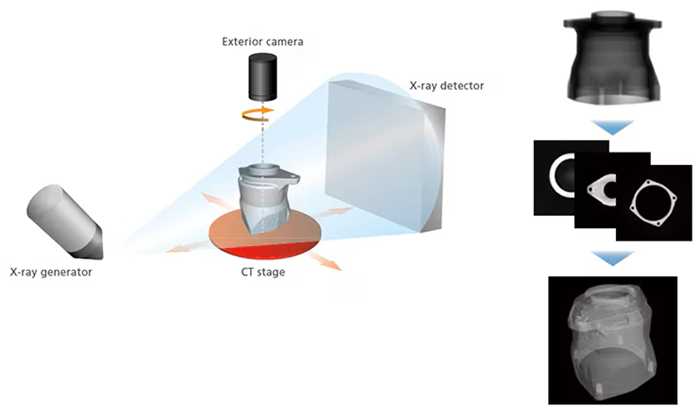
Image Credit: Shimadzu Scientific Instruments
The inspection target (sample) is positioned between the X-ray generator and detector, as illustrated below. The sample is then rotated 360 degrees to acquire X-ray fluoroscopic data from various angles before being calculated into cross-sectional images.
MPR Display
Display any desired cross-section.
Multi-Planar Reconstruction (MPR) layers several CT images in a virtual space to produce four images: a CT image, two mutually longitudinal section images, and a user-selected section image orthogonal to one of the longitudinal section images.
VR Display
Volume rendering (VR) is the process of stacking numerous CT images in a virtual environment to create a three-dimensional image. VR displays require separate 3D image processing software.
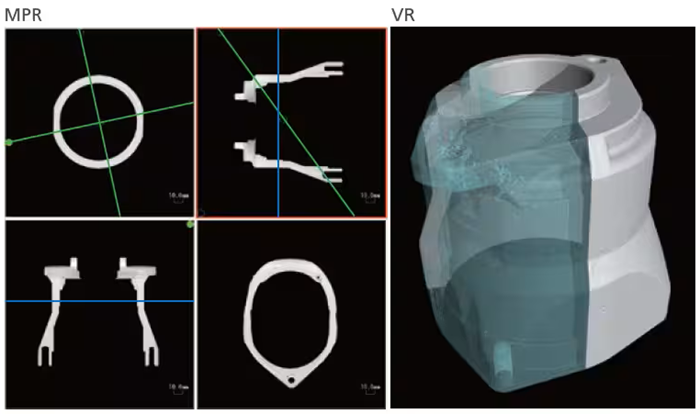
Image Credit: Shimadzu Scientific Instruments
Features
High-Resolution CT Image
Maximum 14 Megapixel Input Resolution
The large, high-resolution flat panel detector has an input resolution of approximately 14 megapixels, providing a wide field of view and high resolution.
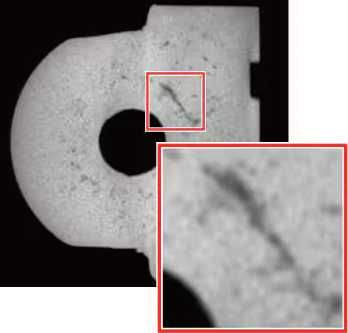
Low-Resolution Cross-Sectional Image. Image Credit: Shimadzu Scientific Instruments
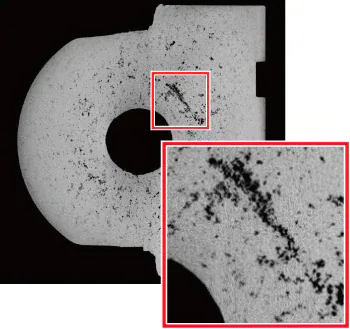
High-Resolution Cross-Sectional Image (14 Megapixel Input Resolution). Image Credit: Shimadzu Scientific Instruments
High-Contrast CT Image
Improvements to the Shimadzu microfocus X-ray generator and the cutting-edge flat panel detector enable unparalleled high output and image contrast.
High-Contrast Detector with Wide Dynamic Range
Cesium iodide (CsI), which has high sensitivity in the long-wavelength range, is used as the scintillator. Using carbon (C) as the detector window material enables imaging of low-density materials. Furthermore, the broad dynamic range (16 bits) allows for the display of minor contrast changes.
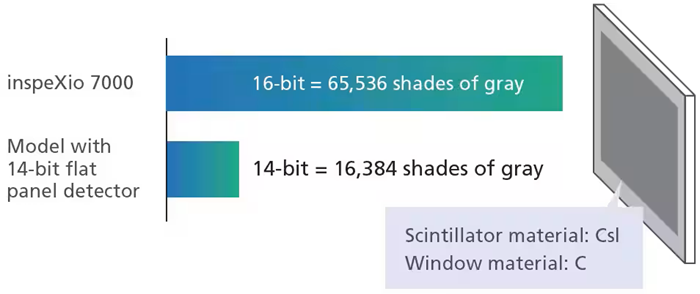
Image Credit: Shimadzu Scientific Instruments
Improved X-Ray Generator
Shimadzu’s microfocus X-ray generating unit now features a newly designed irradiation window. With its higher proportion of soft X-rays in its output, the X-ray generator provides significantly better contrast when scanning low-density materials that readily transmit X-rays.
Comparison of Transmission Images from Non-Woven Fabric

Previous Cross-Sectional Image. Image Credit: Shimadzu Scientific Instruments
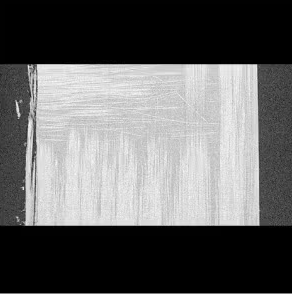
New System Cross-Sectional Image. Image Credit: Shimadzu Scientific Instruments
Easy and Fast CT Scanning
In addition to the automated CT scanning feature, which eliminates the need for the operator to provide parameter values, the system includes an enhanced version of HPCinspeXio. 3.0 high-performance computing system has 50 times greater processing speeds.
Intuitive User Interface
The redesigned user interface has an easy layout for effortless navigation.
Main System Window
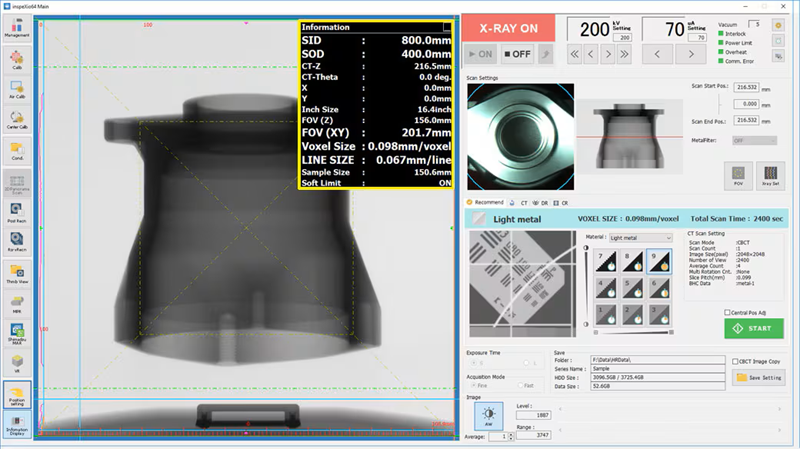
Displays the stage position, scan field of view, equivalent voxel length, and other information in real time, making (the yellow box), it easy to scan images with the specified resolution and field-of-view size. Image Credit: Shimadzu Scientific Instruments
MPR Window
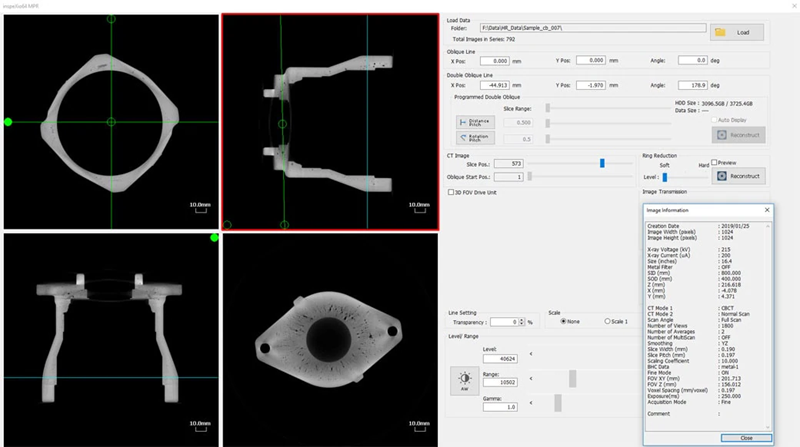
Displays slice, oblique, and double-oblique images, enabling the easy observation of cross-sections. Image Credit: Shimadzu Scientific Instruments
Recommend Scanning Function
The new recommended scanning feature lets you select scan settings easily. Simply pick the material, desired CT image resolution, and contrast level, and the system will optimize the CT scanning parameter settings accordingly.
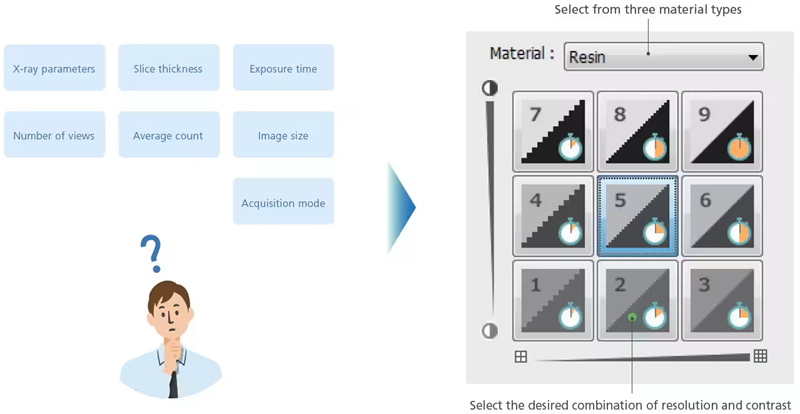
Image Credit: Shimadzu Scientific Instruments
HPCinspeXio High-Performance Computing System ver. 3.0
The new HPC inspeXio high-performance computing system is approximately 50 times quicker than the previous model.
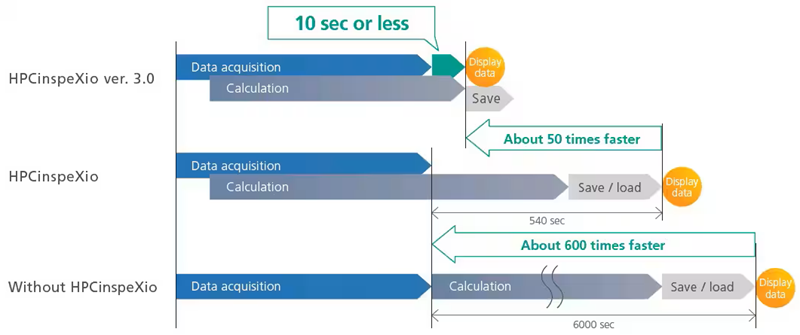
Image Credit: Shimadzu Scientific Instruments
Advanced 3D Image Reconstruction
Once an image has been obtained, it is feasible to magnify only the targeted areas and carry out the reconstruction calculation. Even in works where improving the enlargement ratio is challenging, high-magnification cross-sectional images can still be obtained.
Clear cross-sectional images can be produced even during reconstruction, thanks to a high-resolution panel detector. It is not essential to repeat the CT scanning when merely reconstructing.
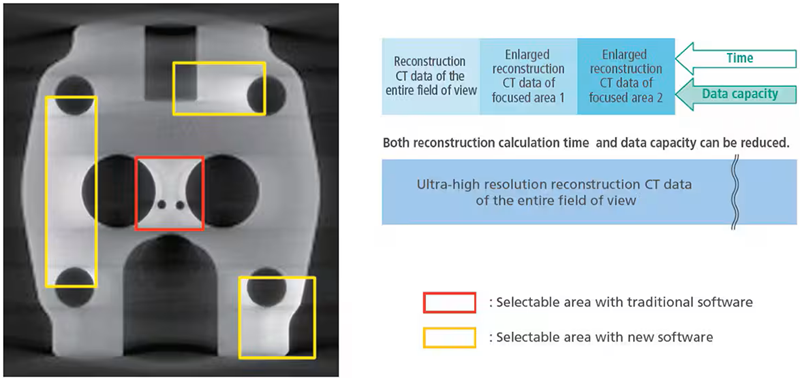
Image Credit: Shimadzu Scientific Instruments
Obtain CT Images in Three Easy Steps
No calibration is required prior to scanning. Scans can begin immediately following sample placement.
Step 1: Insert Sample
The maximum sample and CT scan sizes are 400 mm in diameter and 300 mm in height.
Step 2: Determine Scan Position
Samples are positioned with the camera situated on the rotation axis.
Step 3: Start the Scan
Scans can start instantly without previous calibration. In a standard scan (600 views), data capture can take as little as 33 seconds. Due to the high-performance computing equipment, MPR images are shown in 10 seconds or less after scanning.
3D CT Scan Region Display Function
As the CT stage advances, the relevant CT scan region is presented and overlayed in real time on the MPR display. Additional CT scans of regions of interest can be obtained using the prior CT scan.
Unique Functions
- Door Interlock Mechanism: The sliding door is fitted with redundant interlock circuits. These ensure that X-rays are never released when the sliding door is open. In addition, they prevent the CT stage from shifting when the sliding door is opened
- CR Scan: Computed radiography (CR) can be used to produce transmission images without distortion in the CT-Z direction by capturing data exclusively along the vertical center line of the X-ray detector and moving the CT-Z axis vertically
- Acquisition Mode Switching Function: Long or short scan times can be defined by combining the capture mode and exposure time options
- Anti-Pinch Prevention Mechanism: A finger-pinch prevention feature is included to avoid mishaps when closing the sliding door
- Extended Filament Lifetime: The projected lifetime of the filament is increased by 2.5 times by automatically changing the current setting
- DICOM Conversion Function: CT image data can be converted to DICOM format, the global standard for medical imaging. As a result, this function is required for evaluating data using medical image analysis software
- Collision Sensor: The projected lifetime of the filament is increased by 2.5x by automatically changing the current setting