Reporting, processing, and analyzing lead to true insight. For these insights to be fully realised, the right software is needed.
The ideal software selection depends entirely on the project's needs and the desired workflow.
A software ecosystem ensures that everyone has the appropriate tool for the job, from quick on-site reporting to intricate subsurface modeling. With this method, users can choose the platform, or set of platforms, that best suits the project deliverables, technical specifications, and business strategy.
Geophysical Survey Systems provides solutions to optimize workflow and maximize results, regardless of the user's preference for speed in the field and same-day reporting, the power and performance of cloud-based processing, or the flexibility and familiarity of desktop post-processing.
GSSI Fusion™
If efficiency and on-site, same-day deliverables are essential, choose GSSI Fusion.
Professionals who offer “locate-and-mark” services and must produce prompt, professional documentation before departing the jobsite are the target audience for GSSI Fusion.
In just a few minutes, GSSI Fusion turns a great scan into an excellent report by streamlining the final stage of fieldwork.

Image Credit: Geophysical Survey Systems Inc.
RADAN® 7.
When stability, ownership, and offline access are top requirements, go with GSSI RADAN 7.
Founded on perpetual licensing, RADAN 7 is suitable for users who value complete software ownership, access to specialist modules, and the unchanging dependability of local, offline functionality.
RADAN 7's core data viewing and processing features are always available, without the need for an internet connection or ongoing subscription fees.
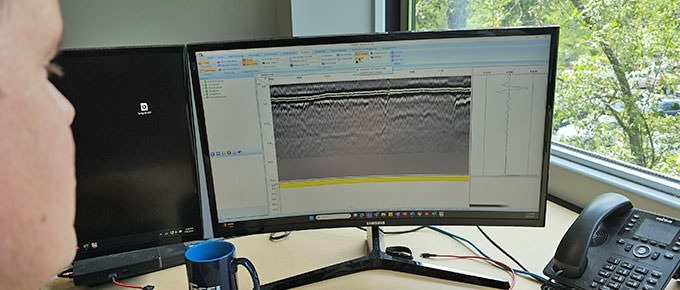
Image Credit: Geophysical Survey Systems Inc.
Geolitix.
Choose Geolitix when power, flexibility, and access to cutting-edge technologies are important. Geolitix uses cloud computing to effectively handle even the biggest datasets.
Geolitix, a subscription platform, benefits from a continuous development cycle that ensures its industry-leading software is regularly updated and enhanced, and new features are introduced.
Geolitix provides comprehensive, integrated GPS features that are game changers for handling datasets from complex field settings.
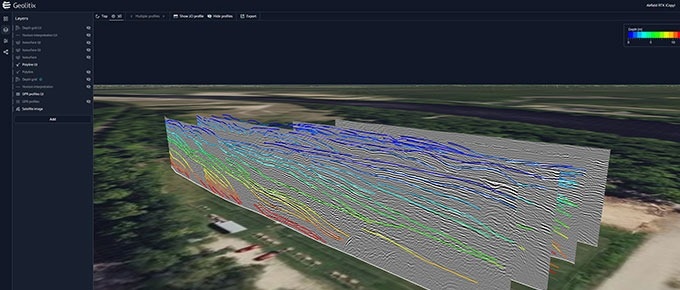
Image Credit: Geophysical Survey Systems Inc.
Which GSSI Software Solution Is Right for You?
Video Credit: Geophysical Survey Systems Inc.
How Do They Compare?
Source: Geophysical Survey Systems Inc.
| Feature |
 |
 |
 |
| Primary Role |
Field Reporting |
Advanced Local Post-Processing |
Cloud-Powered Processing and Collaboration |
| Ideal User |
Field technicians who need to create fast, professional reports on-site. |
GPR analysts and long-time GSSI users who require a powerful, desktop app processing environment, or occasional users who need to open and view GPR data for creating report graphics. |
Professionals and teams seeking a flexible and powerful cloud-based solution for processing and managing small to large data sets. |
| Core Functionality |
Organizes uploaded project data, photos, and GPR screenshots into a polished and shareable report. |
Comprehensive 2D data processing and 3D slice visualization, advanced filtering, and specialized analysis modules. |
Harnesses cloud computing to quickly apply advanced processes or handle very large datasets. Offers a full GPR data processing suite, 3D modeling, impactful visualizations, and advanced geospatial support for import and export of GIS files and basemaps. |
| Use Case Example |
A concrete scanner locates rebar and conduit, then uses their tablet to quickly create a live and shareable report link before leaving the job site. |
An analyst imports, optimizes, and processes miles of highway data using RADAN's specialized RoadScan module, and uses RADAN’s interactive picking tools to map multiple pavement layers for a comprehensive DOT report. |
A surveyor completes a large-scale, weeks-long utility survey with GPR and GPS integration. They upload the massive dataset to Geolitix, using cloud computing for fast processing and overlaying the results on a client-provided DXF basemap. |
| Data Compatibility |
Imports GPR screenshots & project organization from GSSI systems. Cannot view or process GPR data |
GSSI-specific GPR data formats. The longstanding industry standard for processing GSSI data. |
Manufacturer-agnostic. Processes data from GSSI and other major GPR manufacturers. |
| Platform |
Web-based (Cloud) |
Desktop (Windows) |
Web-based (Cloud) |
| Connectivity |
Requires an internet connection. |
Fully offline capable. |
Requires an internet connection. |
| Licensing Model |
Subscription-based (SaaS) with tiered pricing options. |
Perpetual License that is customizable for specialized modules. |
Subscription-based (SaaS) with tiered pricing options. |